
Home » Apple AirTag vs Tile Trackers:Which Should You Buy?
Apple AirTag vs Tile Trackers:
Which Should You Buy?
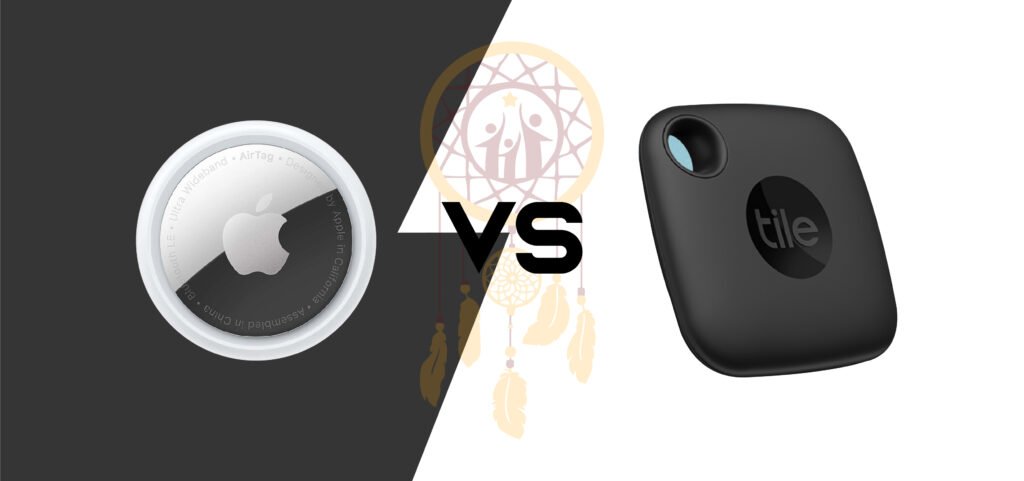
Apple AirTag vs Tile Trackers:
Which Should You Buy?
It is irritating to lose things that you need, such as keys disappearing when you are in a hurry, wallets in the couch and luggage taking time to go wayward in the airport. Bluetooth trackers are designed to be used in situations such as this, and two of the largest companies that you will find are Apple Air Tag and Tile. The two assist you in locating lost objects, but they have various functionalities, are suitable for diverse scenarios, and are suitable for various categories of users. This Touch Your Dreams guide will discuss the most important things, including compatibility, tracking range, accuracy, privacy, features, and long-term value, and you can be sure you have purchased the tracker that suits your lifestyle.
If you want to quickly see the two devices being discussed, you can review the Apple AirTag and the Tile trackers before diving deeper into the comparison.
What Are Apple AirTag and Tile Trackers?
Apple AirTag is a coin-sized device that is a tracker mainly targeted at individuals within the Apple community. You put it on a product, such as keys, a bag, or a suitcase, and use Find My app on iPhone, iPad, or Mac to locate it. AirTag does not have an inbuilt keyring hole, and thus most people buy a keychain accessory with it, although it is famous for its very precise locating features when one is near the item.
The tile trackers can be found in a variety of shapes and designs (such as thin wallet-like and models that can fit on a keyring). Tile is compatible with iOS and Android through the Tile app, and the Tile devices can assist you in ringing your tracker, seeing its last known location, and using additional capabilities depending on the model, such as a louder ring or a longer Bluetooth range.
Compatibility: The #1 Decision Factor
AirTag is designed to be smooth to the touch, in case you have an iPhone. The installation is fast, the Find My integration process is fluid, and the tracker is integrated in the Apple device network. AirTag is a natural fit in case, your home is covered with Apple products, iPhones, iPads, and MacBooks.
The most significant strength of tile is compatibility. Tile is the simpler option, which is normally the case with Android users. In a mixed family (iPhone users and Android users), however, Tile can accommodate everybody, even within the same app, which simplifies management between various devices.
Finding Things Nearby: Precision vs Practicality
The most notable feature of AirTag is Precision Finding, which can be used on the latest iPhones with Ultra Wideband (UWB). Your phone has the ability to tell you how to go and the distance when you are near your item, almost like a mini radar. This will come in very handy when your keys are hidden under the cushion, inside the drawer, or in a bag. This feature is a very big victory for those who always lose their stuff at home or in the workplace.
Tile is more geared towards the everyday discovery. The majority of Tile trackers allow ringing your device and track the sound. Third, more expensive Tile products are more vocal, which may come in handy in case the tracker is hidden in a backpack or under garments. Tile does not as well pinpoint direction guidance as AirTag (unless you are using newer Tile options that compete with it), but it gets the job done with most of the frequent “where did I put it? situations.
AirTag will win in terms of precise close-range tracking, provided that you have a compatible iPhone. When you are interested in simple and dependable ringing and flexible form factors.
Finding Things Far Away: Network Size Matters
Both AirTag and Tile are based on a community network, which assists in finding items when they are not nearby.
AirTag also takes advantage of the Find My network, which is supported by hundreds of millions of Apple devices worldwide. In case your AirTag is lost or left somewhere, in a taxi, or at an airport, nearby Apple devices will sense its presence and update the position in your Find My application. This can be very efficient in the case of crowded places.
Tile relies on the Tile network that relies on other users of the Tile apps. The network of tiles can prove effective, particularly in cities, but it is not usually as huge as the one of Apple. The technical effect is that AirTag tends to be at an advantage in lost faraway situations of recovery just due to the fact that more gadgets can assist in detecting it.
If your top concern is recovering lost luggage or stolen items in a crowded environment, AirTag’s network size is a major advantage.
Design and Use Cases: Keys, Wallets, Bags, and More
AirTag is small and premium-feeling, but it requires accessories for many uses. You’ll likely need a keyring holder or adhesive mount for remotes, bikes, or luggage. That adds cost and one more thing to shop for.
Tile offers multiple styles that fit real-world needs with less extra gear. For example, Tile Slim is made for wallets or passport holders. Tile Mate and Tile Pro are keychain-ready. This is a big deal if you want a tracker that fits naturally into your everyday carry without buying add-ons.
If you want a wallet tracker, Tile usually wins on form factor. If you don’t mind buying an accessory and want Apple integration, AirTag works beautifully.
Battery Life and Maintenance
AirTag uses a replaceable coin cell battery (CR2032) and typically lasts around a year under normal use. When it’s time, you pop in a new battery in seconds. There’s no charging.
Tile depends on the model. Some Tile devices have replaceable batteries, while others have sealed batteries that require replacing the whole tracker after the battery life ends. Newer Tile models have improved, but it’s still important to check which type you’re buying.
If you prefer a “buy once, replace battery, keep it going” approach, AirTag is a clean option. If you pick a Tile model with replaceable batteries, you can get similar convenience, but not all Tile options offer that.
Subscription Costs: Free vs Paid Features
Apple AirTag doesn’t require a subscription for core tracking features. You buy the device, connect it, and you’re good.
Tile has a free tier that covers basic tracking and ringing. However, some features, like smart alerts (getting notified if you leave something behind), location history, and enhanced services, may require a Tile Premium subscription depending on what you want.
If you want the full feature set without ongoing fees, AirTag can feel like a better long-term value. If you’re fine with a subscription to unlock convenience features and you want cross-platform support, Tile can still be worth it.
Privacy and Anti-Stalking Protections
Both brands have had to address privacy concerns because trackers can be misused.
Apple includes anti-stalking measures that alert iPhone users if an unknown AirTag is traveling with them. Apple also provides ways for Android users to detect unknown AirTags with an app designed for scanning. These protections are built around Apple’s ecosystem, and updates continue to improve safety.
Tile also offers scanning and anti-stalking features, but the overall effectiveness can depend on whether someone has the Tile app installed and how settings are configured. Tile has taken steps to reduce misuse, but Apple’s system-level integration gives it a practical advantage in alerting iPhone users.
If privacy protection is a top priority, especially in an iPhone-heavy environment. AirTag has a stronger reputation here due to deeper OS integration.
Accuracy and Real-World Performance
AirTag will be very precise in reality, particularly with Precision Finding. Apple devices are prevalent areas in the Find My network, which also ensures far-away updates are more frequent.
The performance of the tiles is more related to the model and the local network availability. On more expensive models, Bluetooth range can be fantastic and being able to select a form factor that fits your product can enhance the reliability in everyday use.
Overall, AirTag tends to lead in the category of overall tracking power, whereas Tile tends to lead in the category of best fit to different items, particularly wallets and slender carry requirements.
Which Should You Buy? Quick Recommendations
Buy Apple AirTag if…
You are also an iPhone user who desires the most hassle-free experience, the closest locating, and the biggest crowd-based locating. Precision Finding will be a good time-saving feature to save a lot of time and stress in case you frequently drop objects at home or any other places.
Buy Tile if…
You are Android users, have a mixed-device home, or desire more shapes of trackers, such as wallet-like trackers, without having to add any additional accessories. Another option is tile, which can be a perfect match in case you need a simpler and more reliable tracker and will not mind having a separate application (and maybe a subscription with more features).
In Conclusion
Apple AirTag is typically the wiser purchase in case you are heavily invested in the Apple ecosystem, as it is robust, precise, and free of subscriptions with the basic tracking features, and it has the support of the huge Find My network. Tile is also a great and viable option in case you are on Android or require a broader selection of form factors (particularly wallets).
If you want to double-check current availability or pricing before deciding, you can revisit the Apple AirTag details or explore the Tile tracker options.
We hold that the best technology is the type that takes away stress in your day-to-day life and enables you to go through life with greater confidence at Touch Your Dreams. No matter what tracking device you use, be it AirTag or Tile, the true victory is having an easy-to-use system that will not allow lost things to take away your time, calmness, and momentum
Explore More Tech:
“Want to enhance your gaming experience? Check out our guide on the Best Gaming Consoles of 2026 and make the perfect choice!”